Huawei MatePad Paper

Availability
- UKTBC
- USATBC
- EuropeRRP: €499
- CanadaTBC
- AustraliaTBC
Key Features
- Included accessoriesComes bundled with the 2nd gen M Pencil and a folio cover for protection
- A display ideal for readingThe E-ink screen is easier on the eyes than a traditional tablet and great for reading
- Long battery lifeThe MatePad Paper should last for weeks, rather than days
Introduction
The MatePad Paper is an immediately intriguing device in a way not many tablets I have used recently are.
Huawei’s latest tablet has a lot in common with another device I really like, the Remarkable 2, and it also has many nods towards Amazon’s Kindle range – or any other e-reader for that matter.
Rather than a standard tablet designed with content consumption in mind, the MatePad Paper is all about productivity. It’s for writing, taking notes, recording voice memos in meetings and reading – and it makes a very strong first impression.
Screen and Design
- E-ink display is easy on the eyes
- LEDs allow for use without light
- Comes with the M Pencil with 4096 levels of pressure sensitivity
What sets the MatePad Paper apart from the crowd is the tech used in the display. Like a Kindle, this tablet has an e-ink screen and it’s purely monochrome. If you’re after a tablet for Netflix or YouTube, this isn’t for you.
The benefits of an e-ink, e-paper display are that it’s perfectly usable in bright sunlight, doesn’t grate on your eyes as much as a standard LCD and mimics the look of real paper. Huawei utilises those skills here to make a tablet that feels like a large notebook.
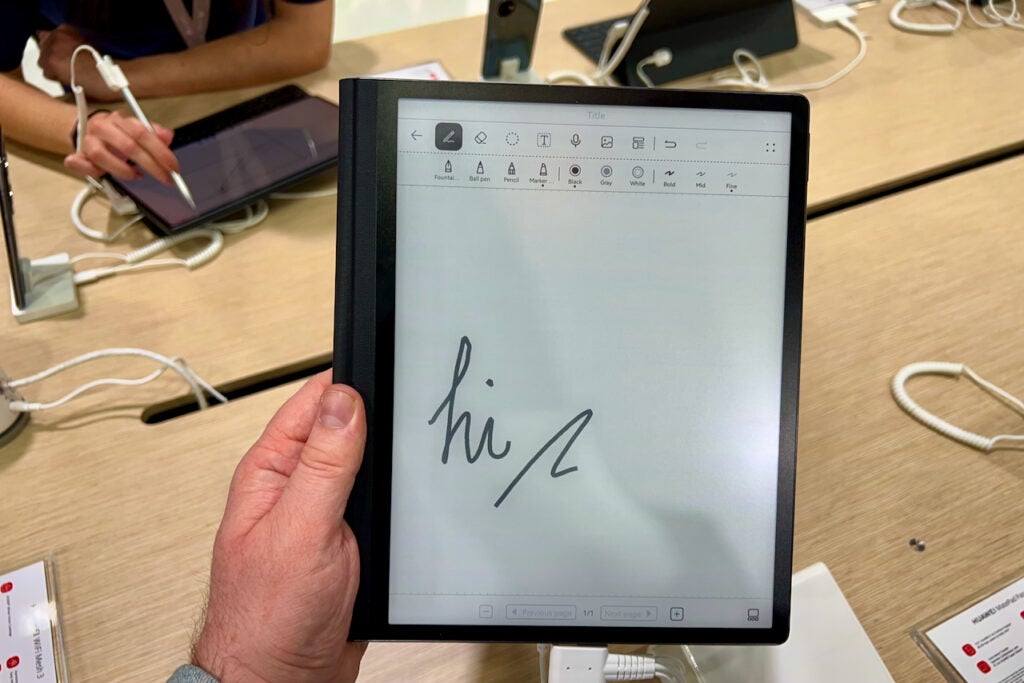
The 10.3-inch screen is a joy. Text is rendered with serious amounts of detail and can display 16 shades of grey to give images enough pop. The display also has a very fine texture to it, just like a quality sheet of paper, that adds a little more resistance when you’re drawing on it with the included Huawei M Pencil stylus. This might seem like a small design choice, but it genuinely gives a much more natural feel to drawing and writing.
Paired with the display is a lighting system made up of 32 LEDs that give an even glow when it’s dark. You won’t need this in daylight, but it’s an important addition to make sure the device is usable all the time.
The rest of the design is fairly simple and reminds me a little bit of the Kindle Oasis. This is down to the extended bezel on one side that gives your hand a comfy place to rest. At 360g it’s far lighter than a traditional tablet of a similar size and much slimmer too at 6.65mm. The sample I was using had a tasteful case attached too, giving the tablet a little more protection.

Specs and Features
- Runs on HarmonyOS for app support
- Wi-Fi, 4GB RAM and 64GB storage
What really intrigues me about the MatePad Paper, and what could elevate it above something like the ReMarkable, is that it runs a version of the Harmony OS software similar to what you’d find on the brand’s phones. This gives you access to apps and services, potentially allowing for things like the Kindle app and other drawing services to be installed. Of course, Huawei’s App Gallery isn’t the most stacked when it comes to popular apps, but the ability to greatly expand the skills the MatePad Paper is there.
The device also forms part of Huawei’s new Super Device mantra, meaning it integrates well with Huawei’s other devices. You could, for instance, easily share a document you’re reading on a Huawei P50 Pro and continue making notes on it with the MatePad Paper. This could be very useful for those who read a lot of documents and don’t want to read them on a bright display or print the pages out.
There’s Wi-Fi 6, 4GB RAM and 64GB storage for files and apps plus Bluetooth 5.2 for connecting up a pair of wireless headphones or speakers. Another neat touch is the fingerprint sensor embedded inside the power button that’ll add some extra security.

Due to the way e-ink functions, it uses the majority of its power when it’s in use and very little when idle. This is why e-readers tend to last for weeks, rather than days. Huawei claims the MatePad Paper can last for 4 weeks on standby, though we’ll have to get the device in for review to see how long it actually lasts for when it’s being used on a daily basis.
First Impressions
I have to admit that I am a bit smitten with the Huawei MatePad Paper, though I am sure it’ll be a very niche device ignored by most people. It’s expensive and very limited compared to an iPad Air 4, however if you read a lot of documents and want a modern-day notebook for books, notes and possibly even apps then you could be very happy with your investment.
You might like…


The post Huawei MatePad Paper appeared first on Trusted Reviews.
https://ift.tt/NbL3A46


Comments
Post a Comment